- Nalitect Studio
- Posts
- Best Budget Laptop/PC for architecture
Best Budget Laptop/PC for architecture
How to find the best Laptop for design

Namara Allan
November 19, 2023
In practice, I spend an average of 10 hours minimum a day in front of a computer screen, that translates to over 3,000hrs a year spent on a screen.
For the marrieds, Not even a wife gets this much attention. Also means If you have the wrong PC, you have the most time of your year spent painfully waiting for an image to load on the screen.
This letter is not a top ten list of best laptops available on the market, those change all the time. This is more of a checklist, principles intended to equip you with the wisdom of choosing the best hardware for you if you happen to be or intend to join the world of architecture and design.
Cheat code: System Requirements
Most software you use as an architect have websites and on these websites, you will find a dedicated page that displays their hardware recommendations or system requirements to comfortably run their software.
This is the First step to getting the right Laptop or PC for your use case. Here are some of the popular software in the Architecture Industry and links to their system requirements:
2D Drafting & 3D Modeling software:
3D Rendering Software:
System requirements for Lumion
V-ray software System requirements
System requirements for Twinmotion
Enscape software System requirements
System requirements for D-5 renderer
Note: Unless you deal with basic 2D linework and basic 3D representation, I would recommend you check out the system requirements in the 3D Rendering software category.
Forexample in my case, I use Archicad for modeling and twinmotion for rendering, so I check out Twinmotion system requirements over archicad.
This is because rendering software are usually very system intensive and determine which PC gives you the best performance that will take care of all your drafting and modeling needs as well.
Alright, The Step above is easy but I totally understand that architects are not necessarily tech savvy and may not understand the recommendations you find on the websites am sending you to.
So lets break things down really simply in their order of importance.
Graphics card or GPU:
1. GPU : The GPU is like the eyes of your laptop/PC, and it affects how well your laptop/PC can see and create your models and images.
This is the first and most important criteria for choosing a PC or Laptop for Architecture work, simply because we deal in images and renderings all the time and is the main reason you want to buy a PC in the first place.
If you get this criteria right, the rest will be kind of taken care of; you will start to notice what I mean when you search for PCs
So You want a laptop with a dedicated GPU, I mean one which has specialized eyes and brain for images and moving pictures, rather than an integrated one, which shares with the CPU.
Currently, Some of the best GPUs for architecture are the Nvidia GeForce RTX, Nvidia Quadro, and AMD Radeon Pro.
2. CPU: The CPU is the brain of your laptop, and it determines how fast you can do multiple things at the same time.
You want a laptop with a smart and quick CPU, with a high clock speed (measured in GHz) Atleat 2point Something GHz speed or more and a high number of cores (at least 4).
Currently, Some of the smartest and quickest CPUs for architecture are the Intel Core i7, i9, AMD Ryzen 5, Ryzen 9, and Intel Xeon .
3. RAM: The RAM is the short-term memory of your laptop, and it affects how smoothly your laptop can remember and work with large and complex information.
You want a laptop with a lot of RAM, at least 16 GB, and preferably 32 GB or more.
Fortunately, RAM is usually expandable, so you can have 8GB in your laptop and you add an 8GB chip to make it 16GB RAM total.
4. SSD or HDD: The SSD or HDD is the long-term memory of your laptop, and it affects how quickly your laptop can recall and store your information.
You want a laptop with an SSD (Solid State Drive: stores information magnetically), which is faster and more reliable than an HDD (Hard Disk Drive: Has moving parts).
Due to budget, you can find one that has both, since SSDs tend to be expensive.
SSD will be for local disk C; So that installed applications run fast, then HDD for long term storage where speed is not a priority.
You want a laptop with enough storage space for your information, Models and image files tend to be space intensive; At least 512 GB or more . A Terra Byte is preferable.
5. Screen: The screen is the display of your laptop, like a window through which you can clearly and comfortably view your work.
You want a laptop with a big and clear screen, at least 15 inches or more, not mini laptops if you want to do professional work.
Also a high resolution, at least 1920 x 1080 pixels or more: 4K with 144HZ refresh rate is ideal.
Because what you want is a laptop with a display that has good color accuracy, contrast and brightness.
Sample Laptops: Best Deals!
Alright, so Using the above criteria, Am heading over to amazon and pulling out budget PCs at a price point of <$1000
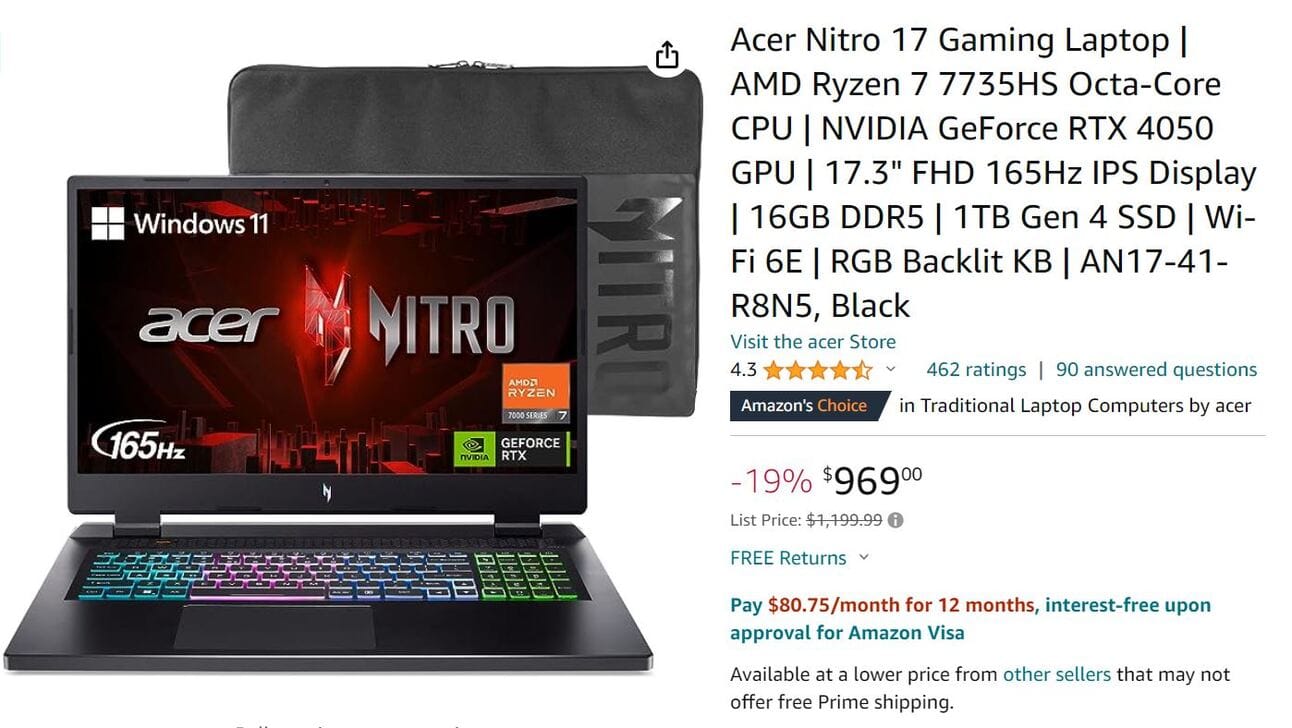
Best limited running deal for high performance laptop

High End Performance still on budget

Standard specification for running smoothly
Incase you have any further questions, you can let me know, I will be happy to chat with you.
Have a lovely week of high performance ahead, Cheers!
-Namara Allan